How do you connect Zoho Marketing Automation lead scoring to an external sales system?
Zoho Marketing Automation was already doing an important job: capturing campaign engagement, building a behavioural picture of prospects and maintaining a dynamic lead score. Beacon, meanwhile, sat within the client’s established sales process.
The challenge was not collecting more data. It was making the changing marketing intelligence inside Zoho Marketing Automation available to the sales team in the system they already used.
Why was a standard Zoho Marketing Automation integration not enough?
A typical contact entered the campaign after a form-based action with a lead score of 15. Further engagement increased that score, with 30 defined as the Marketing Qualified Lead (MQL) threshold.
That meant a one-off form webhook was not enough. A lead could arrive today with a score of 15, move to 23 after further activity, cross the MQL threshold at 31, and continue to 40 or beyond. The original form submission captured only one point in that journey.
There was no suitable native Zoho Marketing Automation-to-Beacon workflow for continuously passing that evolving intelligence downstream. Asking sales users to monitor another platform, compare scores manually or work from exported reports would have created friction rather than value.
What marketing data did the sales team need in Beacon?
We designed the integration around a deliberately compact set of fields that could explain identity, acquisition, engagement, qualification and synchronisation state:
- Identity:
lead_id,email,firstnameandlastname. - Acquisition:
lead_sourceandlead_magnet. - Engagement history:
segment_1_memberandsegment_2_member, representing the forms or campaign assets the contact had engaged with. - Qualification:
lead_scoreanddate_mql_reached. - Synchronisation state:
beacon_lead_score, recording the score most recently synchronised downstream.
The segment membership fields were intentionally campaign-specific. In another campaign they could represent different calculators, guides, webinars, assessments or product enquiries. The principle is reusable: give sales enough behavioural context to understand what a prospect has shown interest in, without forcing the sales team to interpret the marketing platform itself.
The objective was simple: keep Zoho Marketing Automation as the source of truth for marketing engagement while making the relevant signals actionable inside Beacon.
How can Zoho Flow and APIs sync lead scores and marketing engagement data?
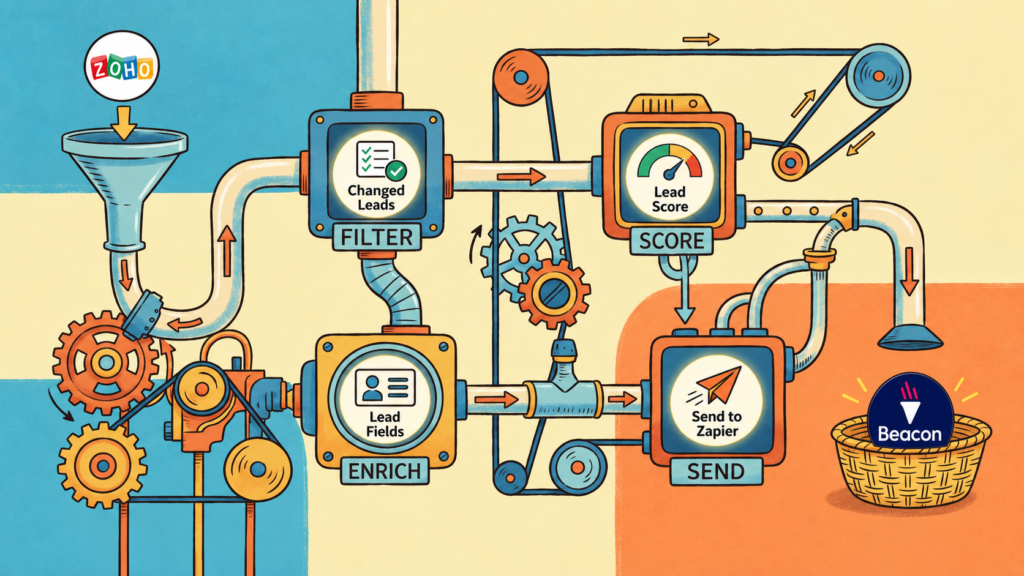
We built a scheduled, state-aware integration using Zoho Flow, custom Deluge functions, authenticated API calls and Zapier as part of the downstream transport into Beacon.
Zoho describes Flow custom functions as a way to add business-specific logic and call APIs when standard workflow actions do not cover the requirement. That flexibility was central to this build.
How was Zoho Flow used to connect Zoho Marketing Automation to Beacon?
The completed process was divided into six coordinated flows:
- Master — runs daily and controls the iterative pass through the relevant Marketing Automation audience.
- Mark Leads for Update — identifies records whose Marketing Automation lead score has advanced beyond the score already known to Beacon.
- Populate Lead Fields — enriches shortlisted records with the marketing and engagement fields required downstream.
- Populate Lead Score — retrieves the latest dynamic qualification score.
- Send Leads to Zapier — batch-transmits the enriched records towards Beacon.
- Update MA Leads — records the successfully synchronised state back in Zoho Marketing Automation.
Separating the work into modular flows made the integration easier to control, test and recover than a single monolithic process.
How do you sync only changed Zoho Marketing Automation lead scores?
The key to the integration is the comparison between the live score in Marketing Automation and the score most recently transmitted to Beacon.
lead_score = 36
beacon_lead_score = 31

36 > 31
=> record requires synchronisation
After the record is enriched and successfully transmitted, the synchronisation state is updated:
lead_score = 36
beacon_lead_score = 36

=> systems are back in parity
If nothing changes on the following day, there is no reason to resend the contact. If further activity pushes the score to 41, the difference appears again and the contact becomes eligible for another update.
This means the daily schedule behaves incrementally. It evaluates the audience repeatedly, but downstream action only occurs when meaningful marketing engagement has advanced.
How is the MQL date captured when a lead score crosses 30?
When a contact exceeded the campaign’s MQL threshold of 30 for the first time, the integration populated date_mql_reached. This preserved the date of the qualification event rather than storing only the lead’s current state.
That distinction is useful to sales: lead_score shows how engaged a prospect is now, while date_mql_reached shows when that prospect first became sufficiently engaged to qualify for follow-up.
How does the integration preserve website and campaign engagement history?
The integration also carries the prospect’s campaign context. lead_magnet, lead_source and configurable segment membership fields help show what initially attracted the contact and which campaign assets they subsequently engaged with.
Instead of seeing only a name and score, sales can receive a more useful behavioural picture: what brought the person into the campaign, what they interacted with afterwards, how their score developed and when they crossed the MQL threshold.
How does the Zoho Flow integration recover if Zapier or an external API fails?
The process was designed around state rather than assuming every connected service would always be available.
If a downstream transmission fails, the integration does not falsely update beacon_lead_score. The record therefore remains out of parity:
lead_score = 45
beacon_lead_score = 39

45 > 39
On the next scheduled run the discrepancy is still detectable, so the record is picked up again automatically. Only after successful downstream processing is the stored Beacon score brought into line with the Marketing Automation score.
This creates a self-recovering synchronisation process: interrupted work remains visible to the system and can be retried on the following run without manual reconciliation.
What results did the Zoho Marketing Automation integration achieve after eight months?
The integration has now been operating in production for just over eight months, long enough to evaluate it as an operational process rather than a proof of concept.
What results did the Zoho Marketing Automation integration achieve after eight months?
- 240+ successful scheduled runs across the live period.
- 160 contacts currently managed by the process.
- Approximately 60% of the current audience — around 96 contacts — was created after the integration went live.
- 250+ meaningful lead changes were identified and transmitted downstream.
- Fewer than five API or functional disruption events were recorded, all associated with external factors such as temporary Zapier issues.
- Interrupted transmissions were automatically recoverable because unresolved records remained out of parity and were eligible again on a subsequent run.
The Flow logs do not extend across the entire eight-month period, so we have deliberately not extrapolated a total number of records evaluated. What can be evidenced is more than 240 scheduled runs across a dataset that has grown to 160 contacts, with the process continuously identifying the relatively small number of records whose engagement had meaningfully changed.
What does the lead scoring data show about marketing qualification?
Contacts typically entered the tracked audience after a form-based interaction with a lead score of 15. The campaign’s MQL threshold was set at 30.
Of the 160 contacts currently tracked, 133 have exceeded the MQL threshold. Only 27 have not. That means 83.1% of the tracked audience has at some point progressed beyond the campaign’s defined Marketing Qualified Lead threshold.
Across the current dataset, the combined lead score is 6,320, giving an average current lead score of 39.5. That is 24.5 points above the typical initial form-conversion score and 9.5 points above the MQL threshold.
This is not an 83.1% sales conversion rate. The audience already consists of people who demonstrated initial intent through a marketing interaction, and Beacon-side sales outcomes were not available for attribution. The figure instead shows how frequently that engaged audience progressed to the campaign’s defined marketing-qualification threshold.
What business value comes from syncing marketing engagement data into the sales process?
The integration did not cause prospects to become more engaged; the campaign and marketing strategy did that. Its role was to make those changing signals available where they could be acted upon.
Sales users did not need another dashboard, a daily CSV export or a new manual process. They could continue working in the existing operational environment while receiving richer context about acquisition source, campaign engagement, current lead score and MQL timing.
The outcome was therefore not simply data movement. It was a practical bridge between marketing intent and sales action.
Do you need to replace existing systems when a native marketing integration does not exist?
Not necessarily.
Native integrations are useful when two platforms have been designed to exchange exactly the information a business needs. Real organisations are rarely that simple. Marketing platforms, CRMs and specialist operational systems often hold different parts of the customer journey, and replacing an established system can introduce more cost and disruption than value.
In this case, Zoho Marketing Automation remained the source of behavioural and qualification intelligence. Beacon remained part of the established sales process. Zoho Flow, custom API logic and Zapier created the missing connection between them.
The important capability was designing a reliable data layer that understood when information had changed, what context sales needed, whether the downstream system had received it, and how to recover when an external service was temporarily unavailable.
Marketing technology should support the way a business operates – not force the business to operate around its technology.
For organisations facing a similar gap between marketing automation and an existing CRM, sales or operational platform, a custom integration can unlock the value already present in the data without introducing another layer of manual administration allowing your in-house sales team to perform with the best data available to them.